
First Launch: From Signup to Your First Order
Seven steps to get your agent responding to customers and sending orders to Telegram, all in about 15 minutes.
An Agent is a salesperson who reads your posts, videos, and website, answers customer questions in chat, and forwards orders to you. Below is the path from an empty account to your first lead. If you have an Instagram profile link or a website address handy, you can set it up in under 15 minutes.
Your account opens immediately after registration; no subscription plan is needed at this stage. Charges only apply when the Agent starts working: analyzing sources and responding to customers. The service will then offer to activate “All-Inclusive” — the first 7 days are free.
What You'll Get#
- A catalog compiled from your posts, videos, or website pages.
- An Agent page with a short link — you can add it to your profile bio.
- Widget code for your website, if you have one.
- Leads and orders delivered to Telegram and your email.
Step 1. Registration#
Open comag.vibevox.pro and click “Try 7 days free”. You will need an email address and a password of at least eight characters. Your email is more important than it seems: leads, payment notifications, and reminders go there.
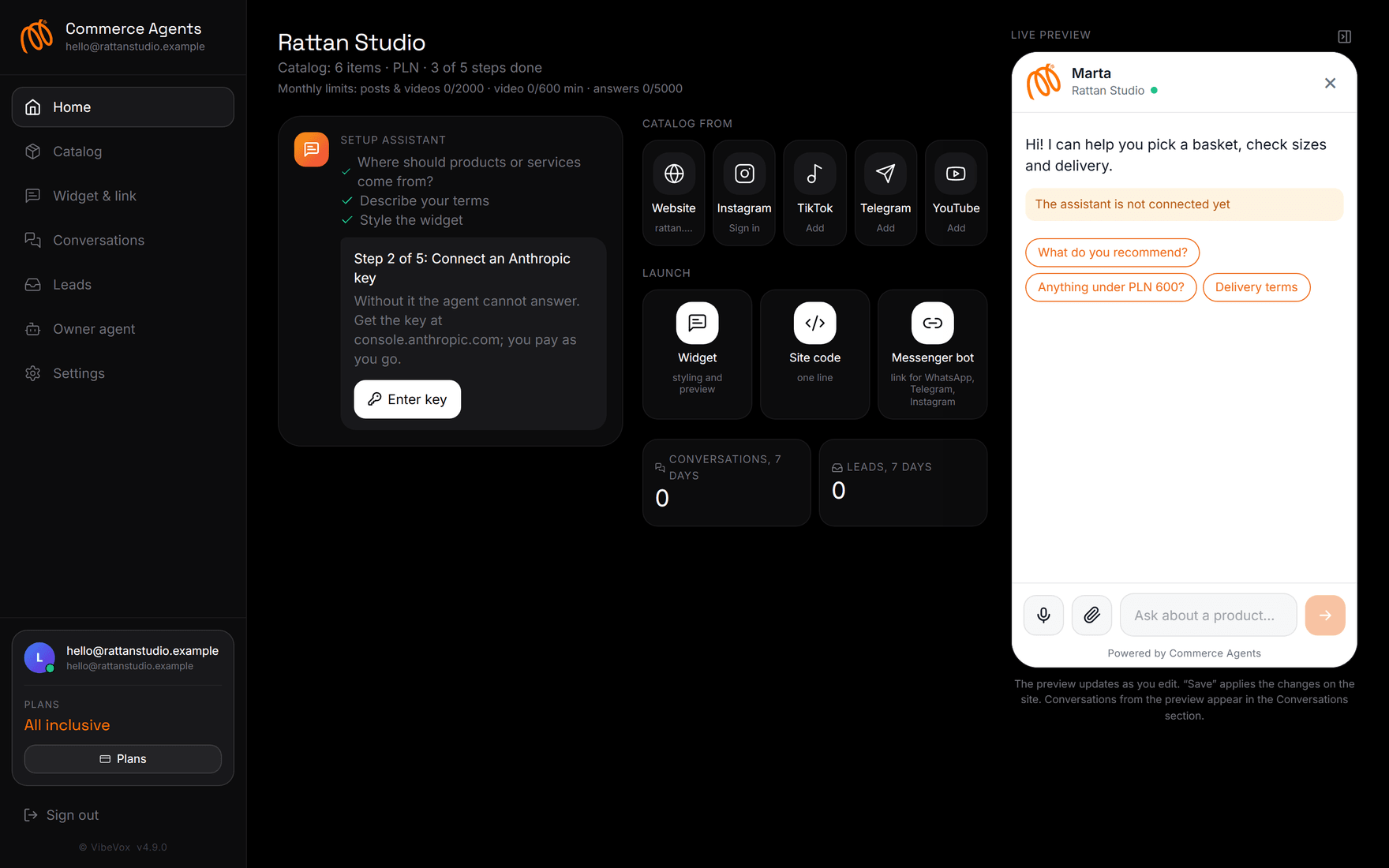
After registration, you land on the account home page. At the top, you'll see your shop name and a “steps complete” counter; below that is the launch assistant. It guides you through the same steps described here and highlights any unfinished ones.
If you registered from a phone, the account is fully functional: the menu is hidden under a button in the top right corner.
Step 2. Where to Get Products From#
The first step of the assistant is “Where to get products or services from?”. Choose what you already have:
| Source | What you need | How long it takes |
|---|---|---|
| Website | address like https://shop.example | 1–5 minutes |
| account username and password | 3–6 minutes per 50 posts | |
| TikTok | profile username | 3–8 minutes |
| YouTube | channel link or @handle | depends on video length |
| Telegram | public channel address | 2–4 minutes |
The Agent will read posts and videos, extract names, prices, sizes, and composition, and turn them into product cards. Details for each source are in the article Connecting Sources.
You can also do without social media: products can be added manually in the “Catalog” section, and services are sometimes easier to describe directly in the shop policies.
Step 3. AI Key or Subscription Plan#
The Agent responds using Claude models. There are two options:
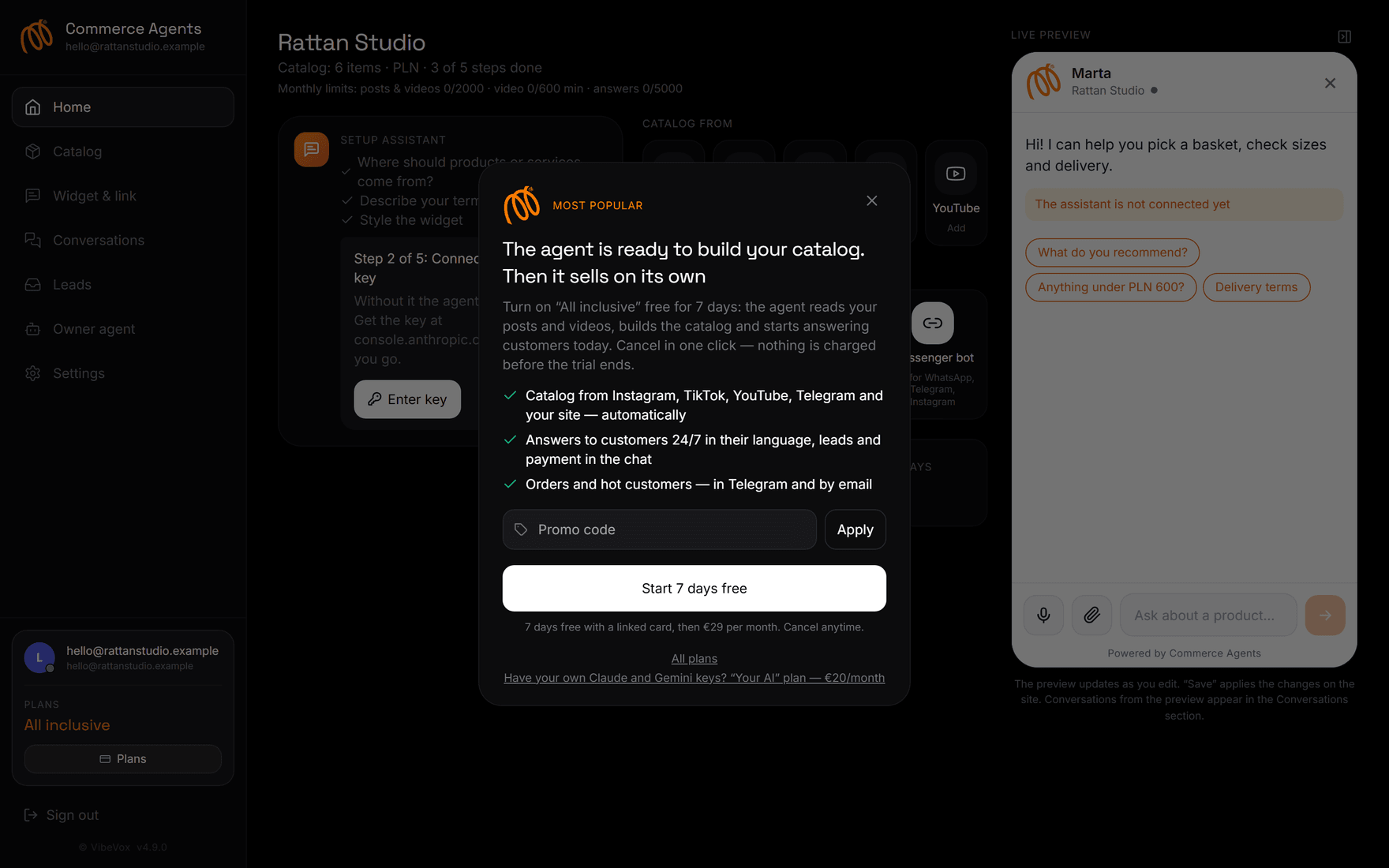
- “All-Inclusive” Plan, 29 € per month. We provide the keys, no input needed from you. The first 7 days are free; your card is linked, but no charges occur until the trial period ends.
- “Your AI” Plan, 20 € per month. You enter your own Anthropic key and Google Gemini key, paying for tokens directly with them. The switch happens automatically: save both keys in the settings, and your plan will change to the cheaper one starting with the next payment.
Get your Anthropic key from console.anthropic.com → Settings → API keys → Create key; your account must have a card linked or a top-up made. The Gemini key is at aistudio.google.com/api-keys; it has a free usage limit. Gemini is needed for videos: it listens to speech and reads on-screen text.
If the Anthropic key is not set and no plan is active, the Agent will not respond. In the account, this is indicated by a yellow bar at the top and the message “Assistant not connected yet” in the preview.
Step 4. Shop Policies#
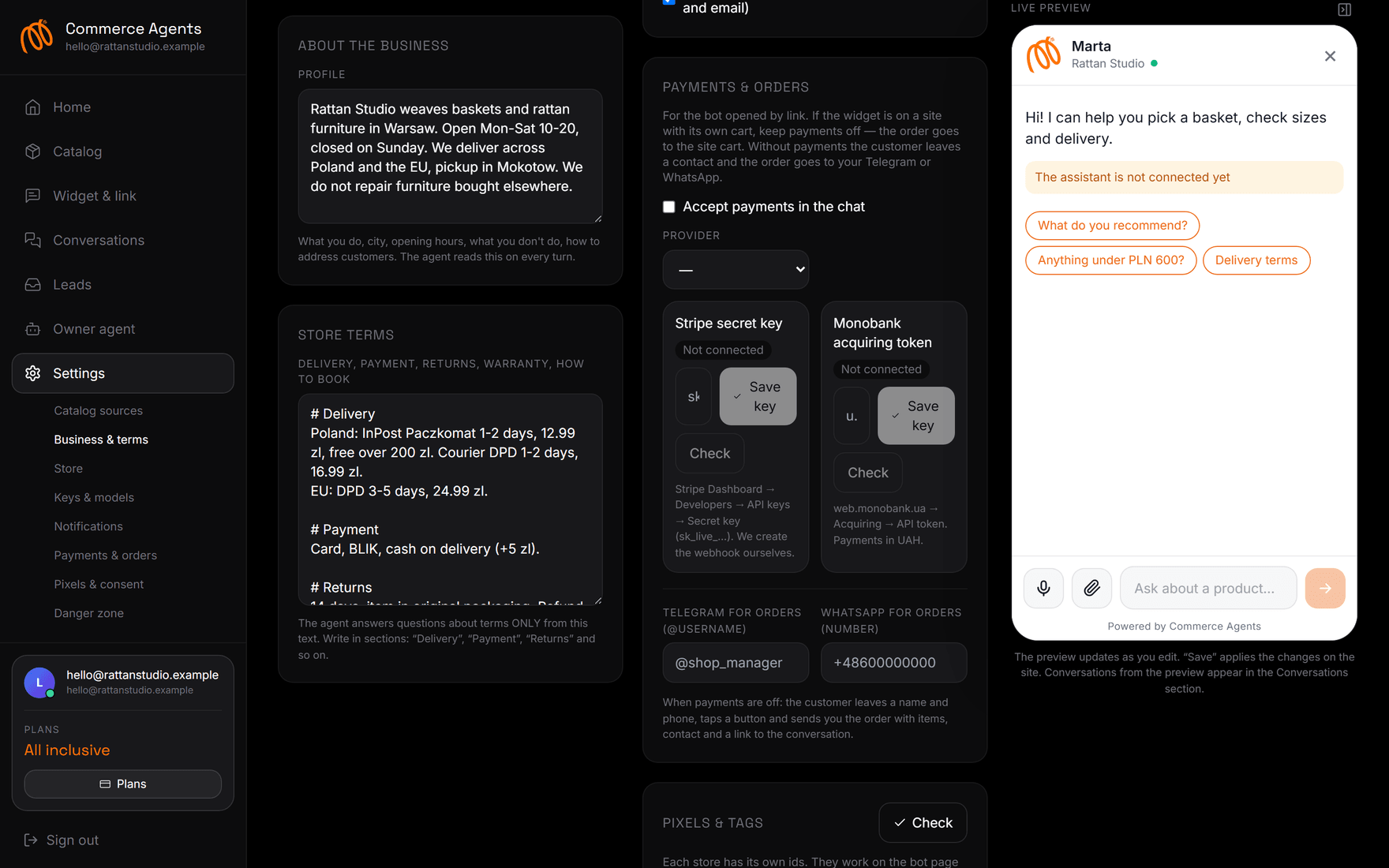
The third step of the assistant is “Describe policies”. This is the only text the Agent uses to answer questions about delivery, payment, returns, and appointments. What is not written does not exist for it: it will not invent terms or deadlines.
Write in sections and be specific:
# Delivery
Within Poland: InPost Paczkomat 1–2 days, 12.99 zł, free for orders over 200 zł.
Within EU: DPD 3–5 days, 24.99 zł.

# Payment
Card, BLIK, cash on delivery (+5 zł).

# Returns
14 days, no questions asked, item in original packaging.
Refunds to card within 3 business days.

# Appointments
Consultation is free, 20 minutes, weekdays 10–19.
Next to it is the “About Business” field — your profile. This is where you describe yourself: what you do, your city, business hours, what you don't do, and how to address customers. The Agent re-reads the profile with each interaction, so a couple of precise lines work better than a page of generalities.
Step 5. Widget Design#
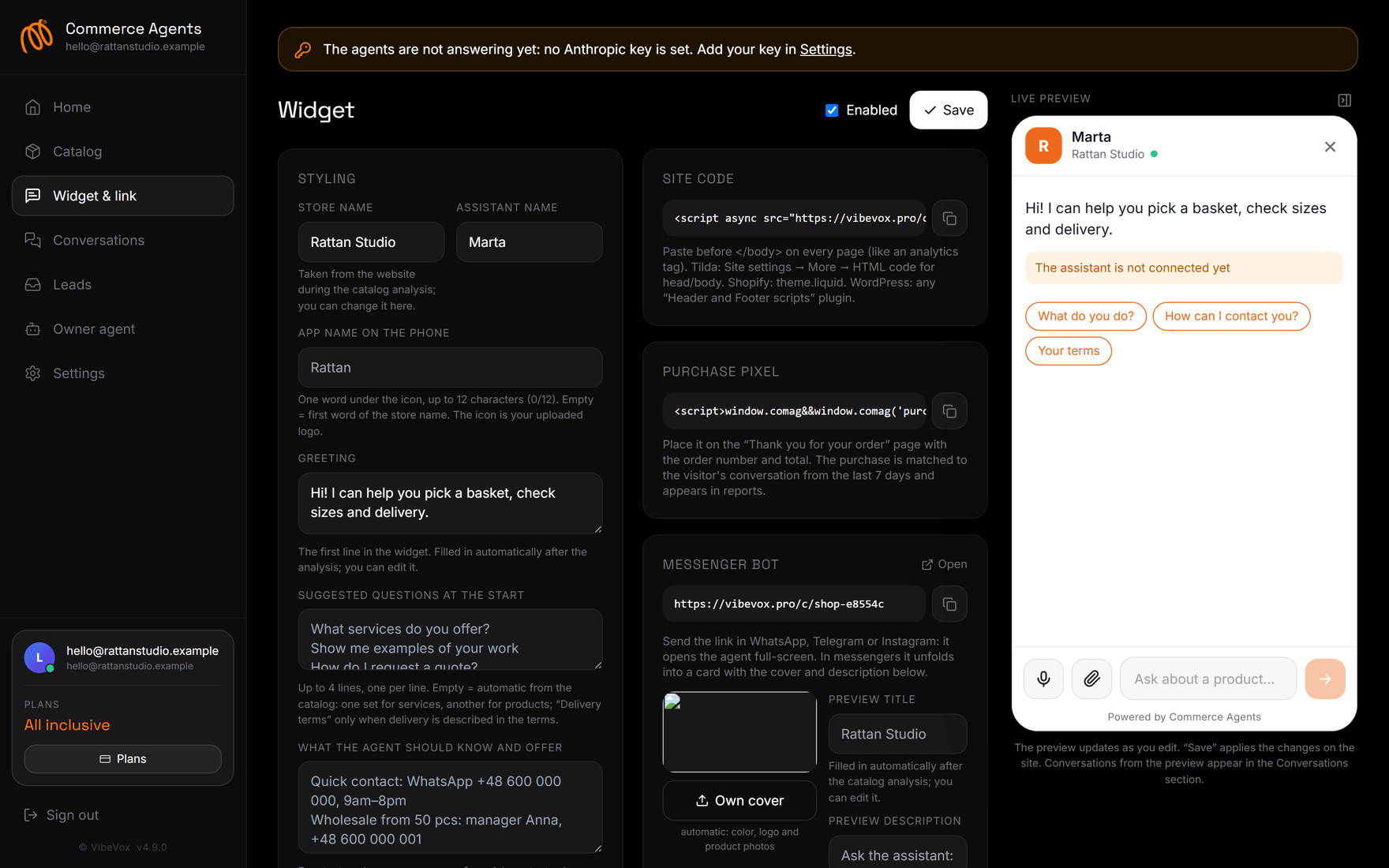
The “Widget and Link” section. Here you set the name, assistant's name, greeting, color, logo, and communication tone. On the right is a live preview: it updates instantly as you type, and the “Save” button applies changes to your website.
Minimum fields to fill out:
- Shop name — appears in the chat header and link preview.
- Greeting — the first phrase. Replace the default one with a more personal message: “Hi! I can help you find your size and tell you about delivery.”
- Logo — this will also become the app icon on the customer's phone.
- Communication tone — select from a list or describe in your own words: “warm and concise”, “expert, formal”.
- Conversation starters — up to four lines. An empty field means suggestions will be automatically generated from your catalog.
Step 6. Telegram Notifications#
It's easier to catch leads on your phone. Open “Settings” → “Notifications”, click the link button, and message our bot on Telegram. After that, new leads, paid orders, hot clients, and a morning summary for yesterday will arrive in the chat.
You don't need to set up emails: they go to the address you used to log in. You can disable email duplicates with a checkbox in the same place.
Step 7. Publication#
Now, show the agent to your customers. On the main dashboard, you'll find three buttons:
- Widget — design and preview.
- Code for Website — a single line, insert it before
</body>on all pages. On Tilda, this is “Site Settings → More → HTML code for body”; on Shopify, it'stheme.liquid. - Messenger Bot — a short link like
comag.vibevox.pro/c/your-store. Use it in your Instagram or TikTok profile bio, or send it via WhatsApp and Telegram. In the messenger, it expands into a card with a cover and description.
Customers can add this page to their phone's home screen. They'll get an icon with your logo, and you'll gain the ability to send them push notifications.
Check: Is it working?#
Open your link in a separate window and ask three questions in a row:
- “What do you have?” — the agent should display catalog cards.
- “How much is delivery?” — the answer should match your terms.
- “I want to order” — the agent will collect the order and ask for contact information.
Then, check “Dialogues” in the dashboard: this conversation will appear there. If contact information was provided, a client card will appear in “Leads”, and a message will arrive in Telegram.
Dialogues from the dashboard preview also appear in the “Dialogues” section. Don't be surprised when you see your tests there.
What to do next#
- Run your catalog through “Owner's Agent” → “Catalog Quality Audit”: it will find cards without descriptions or prices.
- Enable in-chat payments if you don't have a website with a shopping cart.
- Install Meta, TikTok, or Google pixels if you plan to run ads.
- Read the settings breakdown and remove anything unnecessary.
Frequently Asked Questions#
How long does launch take?#
Fifteen minutes if the catalog is compiled from a single source and the terms are already written. A store with a thousand items and three social networks will likely take an evening, as analysis proceeds in batches.
Is a website necessary?#
No. The agent lives at a link, and this link is enough for sales from Instagram, TikTok, YouTube, and Telegram. A website is just another source of products and a place where you can embed the widget.
What happens after seven days?#
If you haven't canceled anything, 29 € will be charged, and the agent will continue to operate. Two days before the trial period ends, we send a reminder email. You can cancel with one click on the “Plan” page; money for the started period is not charged.
Can I use my own keys immediately?#
Yes. Save your Claude and Gemini keys in the settings, and the service will automatically switch you to the “Your AI” plan for 20 €. Our keys will stop being used immediately after yours are verified.
What language does the agent use to reply?#
In the customer's language. The dashboard is translated into 108 languages, and responses adapt to the interlocutor: it replies in Russian to a Russian speaker, in Polish to a Pole, even if the catalog is described in a single language.